
February 2026 Product Feature Updates
- HiLink

- Feb 1
- 2 min read
Streaming: Engagement & Accessibility Update
Large-scale sessions do not have to be silent to be effective.
Today, we’re introducing new audience engagement and accessibility tools for HiLink’s Streaming Mode, designed to make large, view-only sessions more inclusive, responsive, and controlled, without sacrificing the stability that Streaming Mode is built for.
What’s New in Streaming Mode
Streaming Mode has always been optimized for scale. It supports large audiences through a streamlined, view-only interface while presenters operate from the full HiLink classroom.
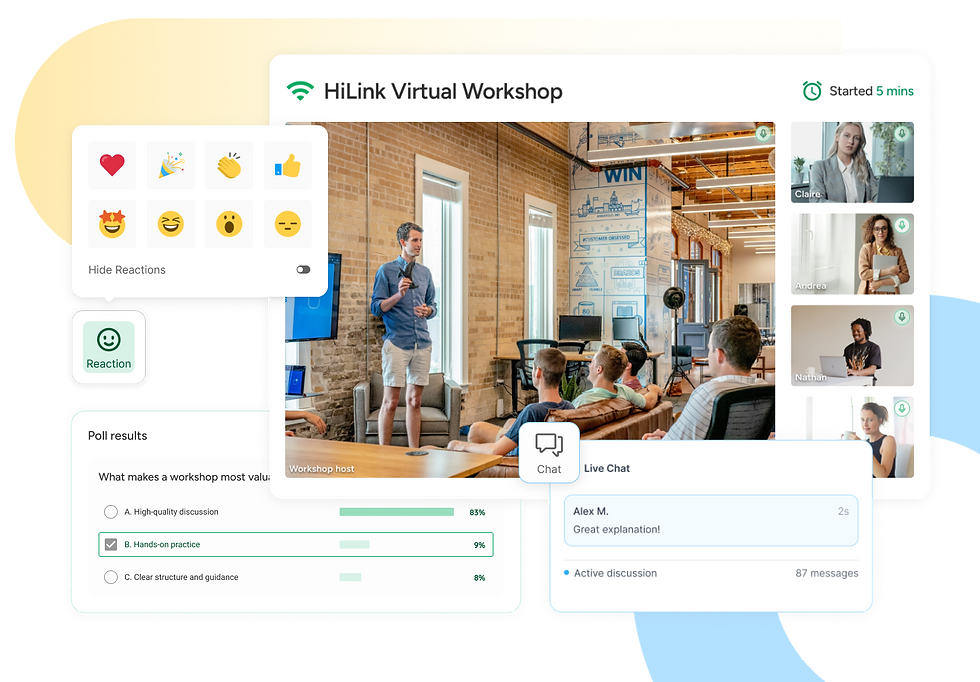
With this update, Streaming Mode now supports:
Live captions for real-time accessibility
Polls to collect instant feedback from large audiences
Emoji reactions for quick, non-disruptive participation
Chat moderation tools that let hosts control when and how viewers engage
Together, these features extend Streaming Mode beyond passive viewing, while preserving its core strengths: performance, simplicity, and control.
Why This Update Matters
Streaming Mode is commonly used for orientations, public webinars, town halls, and large classes, where traditional classroom tools would overwhelm both hosts and attendees.
In these environments, interaction needs to be intentional.
This update helps teams:
Improve accessibility through real-time captions that support diverse learners and accessibility requirements
Encourage participation with lightweight engagement tools that do not interrupt the session flow
Maintain control using moderation features that prevent chat overload and distraction
The goal is not to turn Streaming Mode into a classroom. It is to provide just enough interactivity to keep audiences connected and included.
New Capabilities, Explained
Live Captions
Real-time speech-to-text captions improve accessibility and comprehension for viewers, helping organizations meet accessibility standards and support diverse learning needs.
Polls
Hosts can create and launch live polls during a stream to gauge understanding, sentiment, or audience needs in the moment.
Emoji Reactions
Viewers can respond using emojis as a quick signal of understanding or engagement, without interrupting the presenter.
Chat Moderation Tools
Hosts can enable or disable chat for the entire stream, keeping conversations focused and manageable during large sessions.
Common Use Cases
These tools are already being used across a range of scenarios:
A virtual open house adds live polls and moderated Q&A to capture attendee interest
A founder town hall uses reactions to gather real-time audience feedback without interruptions
A test-prep stream runs quick pulse checks mid-lecture to adjust pacing
A literacy program streams a large reading event with live captions for accessibility compliance
Availability
All engagement and accessibility features are available now in Streaming Mode for institutional clients.
To enable Streaming Mode: Select Streaming Mode in the HiLink Dashboard or pass hasStream: true when creating a meeting via API
To use captions, polls, reactions, and chat controls: These features appear automatically in the Streaming Viewer interface. If you do not see them, contact your HiLink account manager to confirm tenant enablement


Product update notes usually look routine on the surface, yet they often reflect much larger changes happening inside a platform. Small interface adjustments, new scheduling tools, or improved integrations can quietly reshape how professionals manage their work. During a salon-management discussion about digital booking systems, someone mentioned https://styleseat.pissedconsumer.com/review.html while explaining how service providers sometimes compare feedback about scheduling platforms before adopting new software. Conversations like that highlight how incremental updates slowly influence daily routines across entire industries.